
Ticks
Ticks is a tape of big trades. It shows the aggressive buys and sells that cleared a size you set, as they print, grouped into one card per symbol. On the same feed it can also detect TWAP chains — the same order size repeating on one venue, which is what an algorithm slicing a large order looks like — and show liquidations, the positions exchanges force-close.
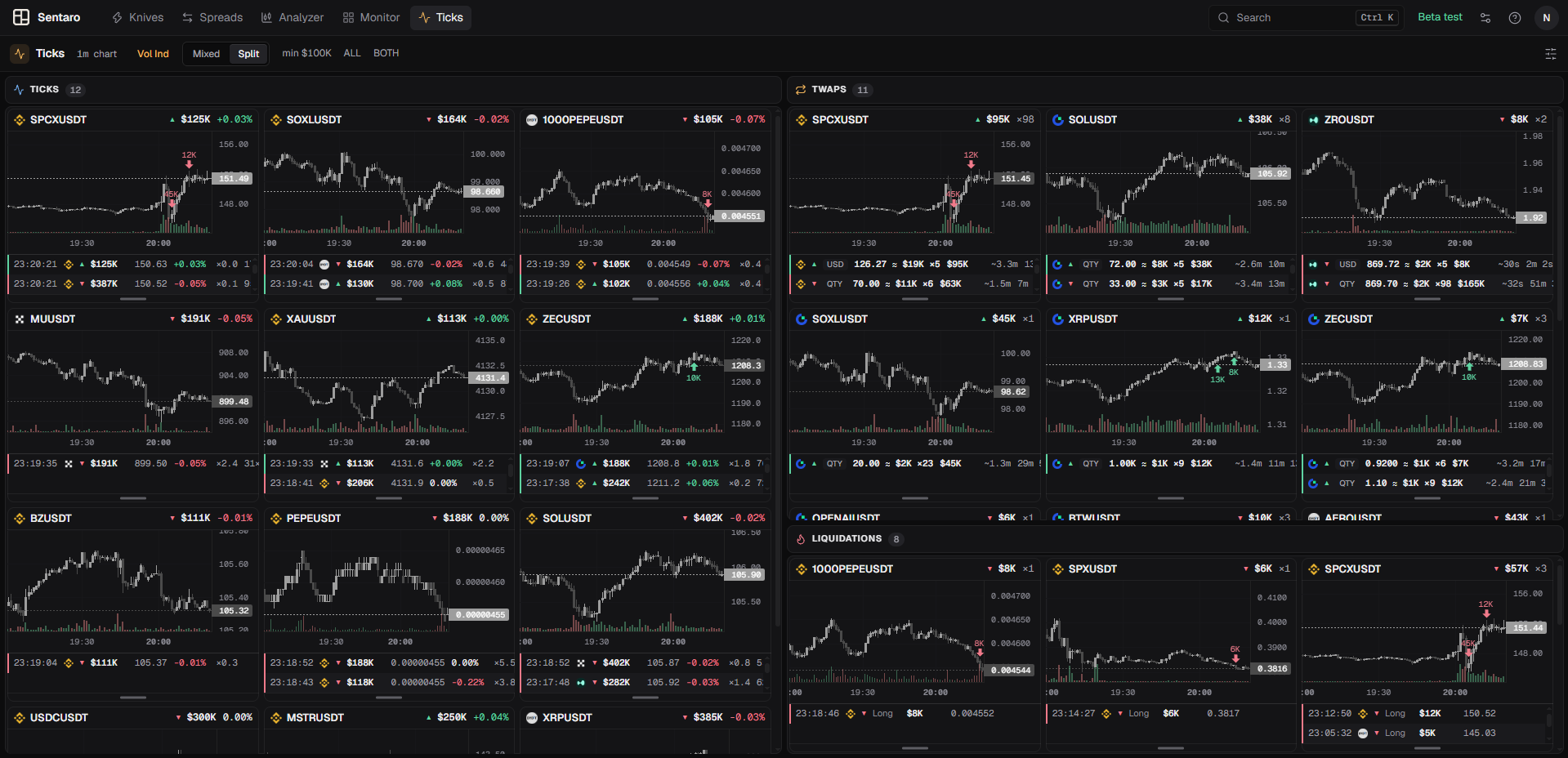
Where Knives tells you a candle moved, Ticks shows you the individual trades that moved it.
What a tick is
A tick is one burst: consecutive prints from the same aggressor, on the same venue and symbol, merged into a single event. A market order that sweeps ten price levels prints ten fills; Ticks shows it as one tick with the combined dollar size, the price move it caused, and a count of how many prints went into it.
Bursts are formed and filtered on the server. The client only receives ticks that already passed your size, move, side and symbol filters.
Venues
| Venue | Market |
|---|---|
| Binance | Perp and spot |
| Bybit | Perp and spot |
| OKX | Perp |
| Gate.io | Perp and spot |
| Hyperliquid | Perp |
| Kraken | Spot |
Kraken is only used here — no other tool reads it.
Reading the window
Titlebar
Left to right:
- Timeframe — the candle interval used by every card's chart. In the web app, click it to pick another; every chart switches at once.
- Vol Ind — turns the volume histogram on or off for every chart in this window.
- Mixed / Split — only while TWAP chains or liquidations are on; see Mixed and split view.
- min $… · max $… — the global burst size band in force.
- ALL / ANY — the match mode.
- BOTH / BUY / SELL — which aggressor side is included.
- …N more — the server hit your delivery cap and dropped ticks. Explained below.
- Disconnected / Offline — connection state.
Before anything qualifies, the window reads Listening followed by the size band it is armed with.
A symbol card
There is one card per symbol. When a symbol ticks again — on any venue — the new tick goes on top of its card's list and the card jumps to the front. Unlike Knives, a symbol that keeps printing big trades is exactly the point, so it is never treated as a duplicate.
The header shows:
- Venue icon — the venue the chart is drawn from. The chart is locked to whichever venue produced the symbol's first qualifying tick.
- Symbol — click to copy.
- ▲ / ▼ — side of the most recent tick: ▲ an aggressive buy, ▼ an aggressive sell.
- $ size — that tick's burst size.
- % move — how far price travelled during that burst.
Under the chart is the card's tick list, newest first. Each row:
| Part | Meaning |
|---|---|
| Time | When the burst printed |
| Venue icon | Where it printed — can differ from the chart's venue |
| ▲ / ▼ | Aggressor side |
| $ | Burst size in USD |
| Price | The last print of the burst — where the tape ended up |
| % | Price move over the burst, in the aggressor's direction |
| ×N.N | When known: the burst against the venue-symbol's average minute (see volume ratio) |
| N× | How many prints were merged. Hover for the time span and the largest single fill |
Drag the handle at the bottom of any card to resize the tick list. The height applies to every card.
Ticks charts are deliberately plain: no drawing tools, no fullscreen and no majors overlay. The tape is about what is printing now. The one addition is liquidation markers.
Delivery cap
If more ticks qualify than the delivery cap allows per second, the server drops the smallest held ticks first — never the newest. The titlebar then shows …N more.
A venue you set to a low size (Kraken can go as low as $200) produces the smallest ticks, so it is the first to go quiet when this happens. Raise the cap if a low-size venue keeps disappearing.
TWAP chains
A TWAP chain is the same taker size repeating on one venue, symbol and side — for example 0.5 BTC bought every 40 seconds. Execution algorithms slice large orders this way, so a chain can reveal someone accumulating or distributing without ever printing a single big trade.
TWAP chains are off by default and completely independent of the tick feed: you can run either one alone, or both.
The TWAP section appears only when the server supports it
The settings section is hidden until the server has announced TWAP support at least once. If you don't see it, open the Ticks window once so it can connect.
A TWAP card
TWAP cards use the same chart-on-top layout as tick cards, one per symbol. The header shows the side and total of the most recently active chain, and ×N — how many chains that symbol currently has.
Each row is one chain:
| Part | Meaning |
|---|---|
| ▲ / ▼ | Side |
| QTY / USD | The kind of chain: the same coin amount each time, or the same dollar value each time |
0.5 ≈ $32K ×14 | Average child size, its dollar value, and how many children so far |
| $ | Total executed by the chain so far |
| Gap | Average spacing between children — real algorithms are rarely perfectly regular |
| Duration | How long it has been running. A dimmed row has ended — no new child for a while |
| % | Cumulative price move since the first child |
Some rows carry a chip:
- 2-SIDED — the same size is also repeating on the other side. Usually a market maker or a volume bot, not accumulation.
- ROUND — a common round size. Could be many traders, not one.
- WEAK — shown on Binance, Bybit, OKX and Hyperliquid. On these deep venues repeated sizes are often a coincidence of many traders. Treat it as a hint.
A chain is a pattern, not an identity
Nothing here proves that one participant placed every child. It is a repeating size on the tape. Read it next to the price action, not instead of it.
Mixed and split view
While TWAP chains or liquidations are on, the titlebar switch changes the layout:
- Mixed (default) — tick, TWAP and liquidation cards share one grid, sorted by recency, with a
TICK/TWAP/LIQbadge on each. - Split — each kind gets its own panel: Ticks, TWAPs and Liquidations, each with a count of its cards. Drag a panel by its header to dock it to any edge of another panel or to stack it as a tab beside it, and drag the gutter between panels to resize them. The layout is remembered.
Liquidations
A liquidation is a position the exchange closes by force when its margin runs out. Ticks shows them from Binance and Bybit perpetuals — the venues that publish them — one card per symbol, like ticks.
Liquidations are on by default and independent of the tick feed and TWAP chains. When you open Ticks, the liquidations of the last 15 minutes that pass your filters are filled in first (up to 50), so the panel is not empty on open.
A liquidation card
The header shows the side and size of the most recent liquidation and ×N — how many that symbol has on the card. Under the chart is the list, newest first:
| Part | Meaning |
|---|---|
| Time | When it printed |
| Venue icon | Binance or Bybit |
| ▲ / ▼ | The resulting pressure: ▼ a forced sell, ▲ a forced buy |
| Long / Short | Which side was liquidated |
| $ | Notional size of that single liquidation |
| Price | The price it closed at |
Colour follows the pressure, not the word
A liquidated long is a forced sell; a liquidated short is a forced buy. Rows and markers are coloured by that resulting pressure, matching the liquidation diamonds in the majors overlay.
Markers on the chart
Every liquidation shown also lands on the chart of that symbol — on liquidation cards and on the symbol's tick and TWAP cards alike. A liquidated long is a red arrow above the candle, a liquidated short a green arrow below it, each labelled with its size. Several in the same candle are added together.
Settings
Open Ticks' settings: the icon at the right of the toolbar (web), or the Ticks tab in the main window (Windows).
Display
Enable ticks feed
Turns the big-trades tape on or off. On by default. TWAP chains are not affected.
Chart timeframe
Candle interval for each card's chart: 1m to 1w. Default 1m.
Cards kept
How many symbol cards the window keeps before the oldest is cycled out. Range 3 to 50, default 12.
Ticks kept per card
How many ticks each card's list holds before dropping the oldest. Range 10 to 500 in steps of 10, default 50.
Size filters
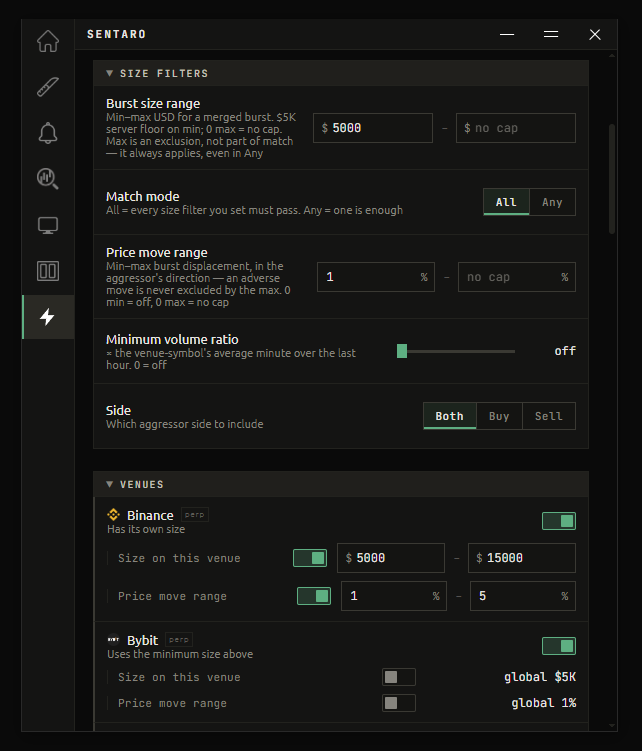
Burst size range
The minimum and maximum USD size of a burst. Default minimum $100,000, no maximum.
The minimum cannot go below the server's floor, which is shown in the description ($5,000 by default). Leave the maximum empty for no cap.
Max is an exclusion, not a match
The maximum always applies, even in Any match mode. It exists to cut out the very largest prints, for example to watch mid-size flow only.
If the maximum is below the minimum, the band matches nothing and the app warns you.
Match mode
How the three magnitude filters — minimum size, minimum price move, minimum volume ratio — combine. Default All.
- All — every filter you have set must pass.
- Any — one passing filter is enough.
Price move range
The minimum and maximum price move during the burst, in the aggressor's direction. Range 0% to 5% (the server's ceiling) in 0.1% steps. 0 minimum = off, empty maximum = no cap.
An adverse move — price going against the aggressor — is never excluded by the maximum.
Minimum volume ratio
The burst measured against the venue-symbol's average minute over the last hour. Range 0 to ×20 in ×0.5 steps, default off.
×5 means the burst alone traded five times what that symbol normally trades in a whole minute on that venue. It catches trades that are big for that coin rather than big in dollars.
Side
Which aggressor side to include: Both, Buy or Sell. Default Both.
Venues
One block per venue. Each can be:
- Switched off — nothing from that venue arrives.
- Given its own size range — overrides the global burst size for that venue only. $100K is routine on Binance perps and a very large trade on a thin spot book, so this is how you keep both meaningful.
- Given its own price move range — same idea, for the move filter.
A venue without its own values shows global and the band it follows. Some venues have a lower server floor than the rest — the block says so. Their ticks are the smallest in the feed, so they are the first dropped if the delivery cap is hit.
If every venue is switched off, the app warns you that nothing can arrive.
TWAP Chains
TWAP Chains
Turns TWAP detection on or off. Off by default.
Cards kept
Card limit for TWAP cards. It is separate from the tick card limit. Range 3 to 50, default 12.
Min child size
The minimum average dollar size of one repeat. Default $1,000. There is no server floor: some real chains are $20 children.
Min repeats
The minimum number of children seen so far. Range 3 to 50, default 5. The server treats anything below 3 as 3.
Min total size
The minimum dollar total executed by the chain so far. Empty = off.
Min price move
The minimum cumulative price move so far, in the aggressor's direction. Range 0% to 5%. Most chains barely move price, so a high value shows almost nothing.
Chain kind
- Qty — the same coin amount each time.
- Usd — the same dollar value each time.
- Both (default).
Max average gap
Only chains whose children average at most this many seconds apart. Empty = off.
Hide two-sided
Drops chains where the same size is also repeating on the opposite side — the ones marked 2-SIDED. Off by default.
TWAP Venues
TWAP detection runs on Kraken spot, Gate.io perp and spot, Hyperliquid, Binance, Bybit and OKX. Each venue can be switched off, and can have its own Min child $ and Min repeats.
Binance, Bybit and OKX have a server minimum child size of $5,000. A child smaller than that is never tracked on those venues, so a lower setting there matches nothing — the block tells you when that is the case.
Symbol whitelist
These filters apply to both ticks and TWAP chains.
Symbol whitelist
Only show these symbols. Empty shows every symbol. Type a symbol and press Enter; several can be added at once separated by commas.
Blacklist
Symbols to never show. Default: BTCUSDT, ETHUSDT, BTCUSD, ETHUSD — the two majors print big trades constantly and would otherwise fill the window.
Each venue keeps its own spelling
Symbols are matched as the exchange writes them. Kraken sends BTCUSD, not BTCUSDT. To block or follow a coin everywhere, list every spelling of it.
Exclude stock/commodity perps
Drops XAU, XAG, TSLA and similar tokenized perps. Off by default.
Minimum 24h turnover
Hides thin symbols by their 24-hour turnover. Range $0 to $50M in $1M steps, default off. A non-zero value also hides symbols whose turnover is not known yet.
Delivery cap
The maximum number of ticks per second the server delivers before it starts dropping the smallest held ones. Range 1 to 200, default 20.
Liquidations
Enable liquidation tape
Shows forced position closes as they happen. On by default. Everything below is inert while this is off.
Cards kept
How many liquidation cards the window keeps before cycling out the oldest. Range 3 to 50, default 12.
Minimum size
The size of a single liquidation, in USD. Range $5,000 to $1,000,000 in $5,000 steps, default $50,000. It applies to every venue that does not have its own size. $5,000 is the server's own floor.
There is no adding up: a liquidation shows if it alone is at least this size.
Per-venue settings
One block each for Binance and Bybit:
- A switch to mute that venue entirely.
- Size on this venue — its own minimum size. Off, it follows the minimum size above.
$50K is routine on Binance but can be a large event elsewhere, so giving each venue its own size keeps one venue from drowning out the other. If both venues are muted, the app warns you that nothing can arrive.
Minimum 24h turnover
Hides thin symbols by their 24-hour turnover. Range $0 to $50M in $1M steps, default off. A non-zero value also hides symbols whose turnover is not known yet.
Blacklist
Symbols to never show. Type one and press Enter to add it; Clear all empties the list.
Liquidation sound
Plays a sound when a liquidation arrives. Off by default. This fires on every liquidation that passes your filters — raise Minimum size first, then turn it on.
Notifications
Tick sound
Plays a sound when a qualifying tick arrives. Off by default. With a low minimum size this fires a lot — set the filters first.
Related
- Majors overlay — big trades drawn on a chart at the price they printed
- Knives — candle-level moves rather than individual trades