
Spreads
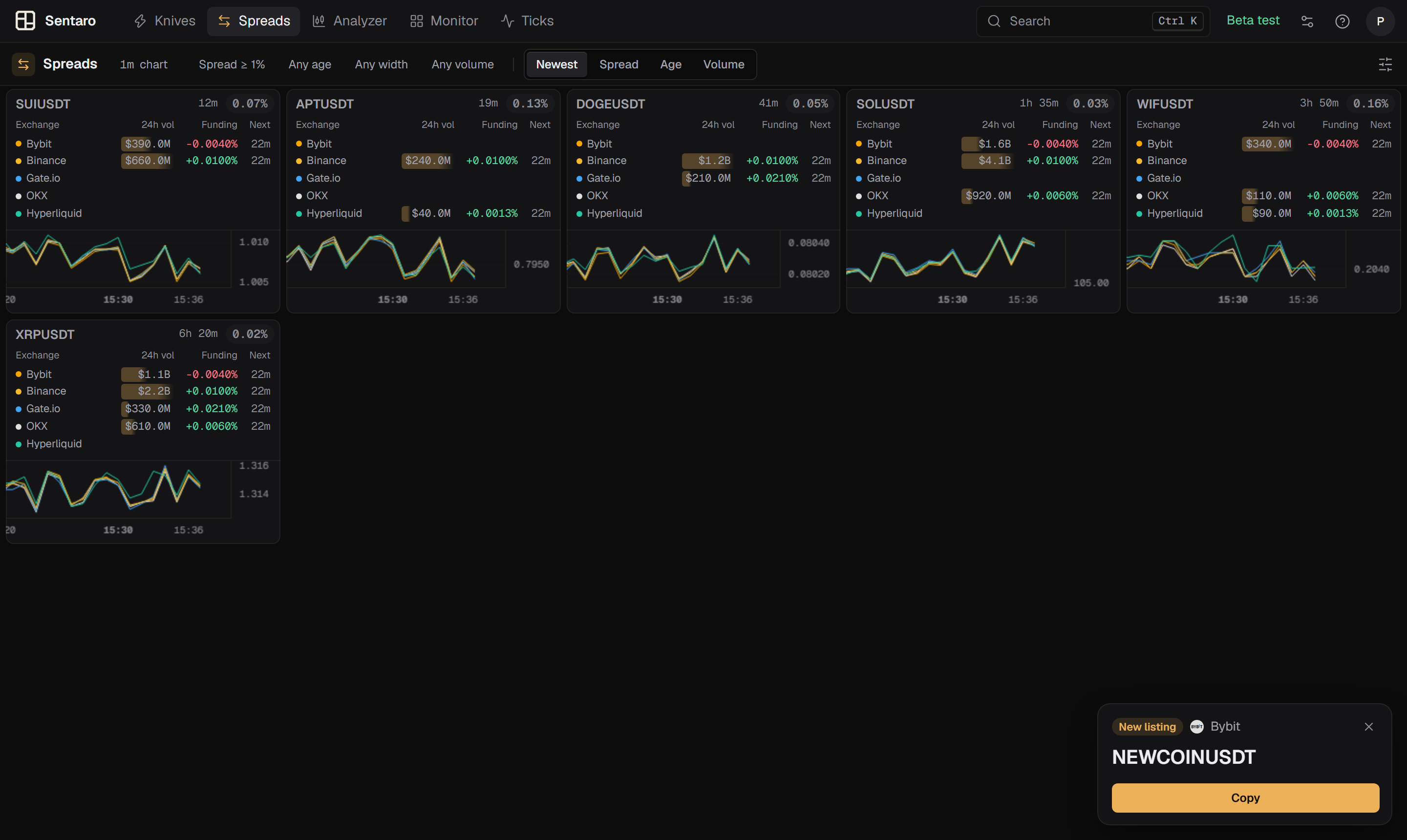
Spreads shows the same coin priced differently on different exchanges right now: how wide the gap is, how long it has been open, and the volume and funding behind every price.
Formerly Alerts
Until October 2026 this tool was called Alerts and also showed new listings and liquidations. Listings are now pop-ups in every tool, and liquidations moved to Ticks.
Reading the window
Toolbar
The toolbar shows the settings in force. In the web app each chip is a quick filter you can click to change in place:
- Timeframe — the candle interval of the cards' charts, e.g.
1m chart. - Spread ≥ … — the minimum spread.
- Max age — max spread age;
Any agewhen off. - Max width — max spread %;
Any widthwhen off. - Volume — the volume filter;
Any volumewhen off. - Sort — the order of the cards: Newest, Spread, Age or Volume.
Order
By default cards are ordered newest first, by when the spread opened. A card keeps its position as its numbers update, so the feed does not reshuffle under you while you're reading it. In the web app you can sort by the widest spread, the longest open, or the highest combined volume instead.
A spread card
Symbol — click to copy it to your clipboard.
Age — how long the spread has been at or above your threshold, e.g.
12mor3h.Spread — the live maximum price spread across exchanges, as a percentage.
Exchange rows — one row per exchange that lists the coin, with a colored dot matching its line on the chart:
Column Meaning Exchange Where the price comes from 24h vol That exchange's 24-hour volume. The shaded bar shows its share of the coin's total volume across these exchanges Funding The current funding rate there — green when longs pay, red when shorts pay Next Time until that exchange's next funding payment Chart — one price line per exchange, so you can see whether the gap is opening, closing, or holding.
Fullscreen — the expand button opens the card full size; see Fullscreen.
Dimmed cards
A card turns dimmed when its live spread drops back below your minimum spread. The spread is not over yet — the server keeps it open until it has stayed below the threshold for 10 minutes. If it widens again, the card lights back up and keeps its age. If not, it drops out of the feed.
The sound plays once per new spread, not again when a dimmed card comes back.
How the spread is calculated
The percentage is (highest price − lowest price) ÷ lowest price × 100, taken across every exchange currently reporting that coin.
This figure is live. It is recomputed continuously from the same exchange streams that feed the chart lines, so it tracks the current gap rather than the gap at the moment the spread opened.
Two kinds of price are left out, because neither is a gap anyone can trade:
- A frozen price. An exchange that has gone a whole 5-minute candle without a single trade on the coin is dropped from its spread — a delisted contract in settlement keeps streaming its last price for hours.
- A different asset under the same name. A price more than twice, or less than half, the middle price across exchanges is treated as another coin with the same ticker (for example a stock perp and a crypto token both called
BB) and left out. If only two exchanges remain and they disagree that much, the coin is not shown at all.
A spread is not a guaranteed profit
The number is a difference between two quoted prices. It says nothing about whether you could actually trade it — order book depth, fees, funding, transfer time and withdrawal availability are not part of the calculation, and a visible gap can close before an order fills. Treat it as a signal to look, not a result.
The chart is deliberately zoomed in with tight price margins, because the gap between exchange lines is usually small relative to the price and would be invisible at a normal scale.
Fullscreen
The expand button opens a card at full size: the same price lines per exchange, the exchange rows with volume and funding, the live spread and its age. Pick the timeframe at the top. In the web app the fullscreen chart also has the drawing tools; drawings here are kept per coin, separately from the other tools. Press Esc or the close button to exit.
Settings
Open Spreads' settings: the icon at the right of the toolbar (web), or the Spreads tab in the main window (Windows).
Display
Max cards
How many cards the feed shows at once. Range 3 to 50, default 9.
Chart timeframe
The candle interval used for the price lines inside the cards. Options: 1m, 5m, 15m, 30m, 1h, 4h, 1d, 1w. Default 1m.
This only changes the chart. It does not change how the spread is calculated or which spreads qualify.
Spread settings
Minimum spread
The spread a coin must reach before it shows up. Range 1% to 10% in 0.5% steps, default 1%.
A spread that falls back below this value is dimmed, not removed at once. It leaves the feed after 10 minutes below the threshold.
Max spread %
Hides spreads wider than this. Default off (empty). The − / + buttons step by 5%, or type any value.
A spread of hundreds of percent is almost never a real opportunity. The server already leaves out different assets with the same name, but a cap still helps with the rest. 50% is a good starting point.
Max spread age
Hides spreads that have been open longer than this. Steps: Off, 30m, 1h, 2h, 4h, 8h, 12h, 1d, 2d, 3d, 7d. Default Off.
A gap that has stayed open for days is usually structural — a suspended withdrawal, a different token — rather than something that will close.
Notifications
New spread sound
Plays a sound when a new spread opens. On by default.
Volume filter
Enable volume filter
Filters spreads by 24-hour trading volume. Off by default.
It takes two
A spread needs at least two exchanges above the minimum volume to pass the filter. That is deliberate: a price gap is only meaningful if both sides of it have real trading behind them.
Minimum 24h volume
The 24-hour volume, in USD, an exchange needs for its side of a spread to count. Type the amount; default $1,000,000.
Greyed out unless the volume filter is enabled.
All of these filters run on the server
Minimum spread, max spread %, max age and the volume filter are all applied on the server, so a hidden spread never reaches the app at all. Changing a value takes effect within a second.
Related
- Knives — single-exchange price moves rather than cross-exchange gaps
- Monitor — ranked market overview
- New-listing pop-ups — formerly part of this tool